05A
IronClock Smart Tags — No Kiosks, No Tablets
Mount an IronClock Smart Tag at your site entrance. Your crew taps their phone to clock in — no tablets, no kiosks, no maintenance costs.
Every clock-in verified with GPS, a selfie, and a Smart Tag tap. Timesheets build themselves, payroll syncs to QuickBooks, and your records are ready when OSHA shows up.
Setup in under 5 minutes. No contracts. Audit-ready from day one.
Powering real construction crews every day
Four leaks draining payroll on most job sites. If you've dealt with even one, you know what it costs.
Buddy punching costs the average construction company 2-5% of payroll. That's real money walking off the job site every single pay period.
Paper timesheets, Excel spreadsheets, and chasing supervisors for approvals. Your admin team deserves better than data entry all week.
Expired certifications, missed orientations, undocumented safety meetings. One OSHA audit or client inspection can cost you the entire project.
When time records are unreliable, disputes follow. Delayed pay means an unhappy crew and higher turnover on every job site.
There is a better way.
From a triple-verified clock-in on the crew's phone to verified hours on the live site board — the whole loop, running.
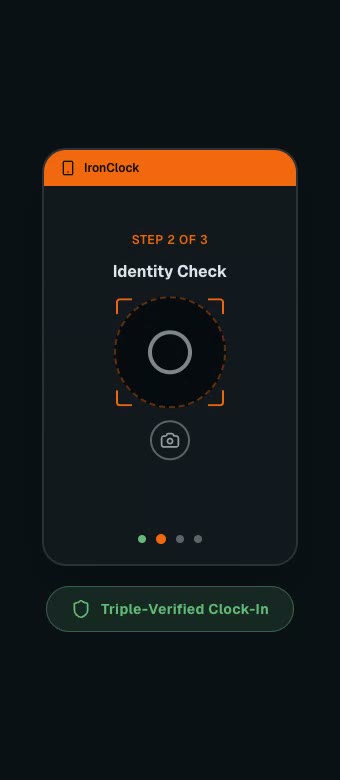
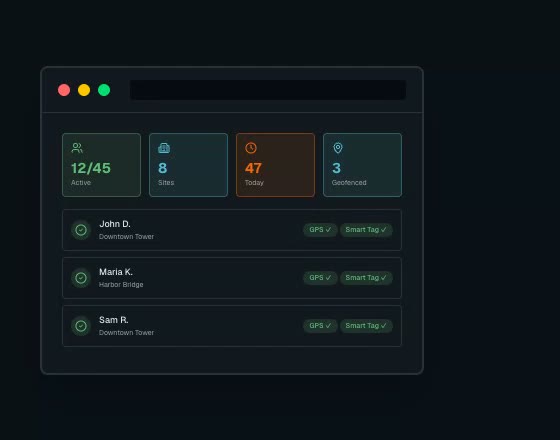
The three systems that end buddy punching, audit scrambles, and timesheet Fridays.
Whether your crew uses smartphones, taps an IronClock Smart Tag at the site entrance, or walks through a GPS geofence — every punch feeds into one unified system with GPS coordinates and selfie photos.
Your crew clocks in from their phone with one tap and a selfie
Mount a Smart Tag at your entrance — crew members tap to clock in instantly
Supervisors clock the crew in and manage time from any browser
Auto clock-in/out when crew members cross the site boundary
No kiosks, no tablets, no IT department. A Smart Tag at the gate and the phones your crew already carries.
Create your account, add your sites, set up geofences, and mount IronClock Smart Tags at entrances. Takes under 5 minutes.
Your crew clocks in via mobile app, Smart Tag tap, or GPS geofence. Every punch verified with GPS coordinates and a selfie.
Timesheets generate automatically with overtime and break calculations. Approve, export, or push to QuickBooks with one click.
Eight more reasons you won't need a second app — from Smart Tags at the gate to bilingual safety records.
Mount an IronClock Smart Tag at your site entrance. Your crew taps their phone to clock in — no tablets, no kiosks, no maintenance costs.
Configurable max shift hours with automatic clock-out. Paid/unpaid break rules, lunch deductions, and waiver workflows built in.
Owners, PMs, accountants, and crew members each get exactly the access they need — no more, no less.
Attendance, labor costs, compliance audits, and safety reports. Filter by site, project, or date range. Export to CSV.
Missed clock-outs, expiring documents, pending approvals, and safety alerts — supervisors stay informed automatically.
Full English and Spanish support across web and mobile. Orientations, safety meetings, and crew UI — all bilingual.
Every clock-in, approval, and change is logged with timestamps. Ready for compliance audits and dispute resolution.
Own more than one company? Run them all from a single login — each org's data stays completely isolated with independent settings and permissions.
Crew size and average rate — that's all it takes to see what time theft and manual timesheets cost you every year.
See these numbers run on your own crew. 15 minutes, no obligation.
* Estimates based on American Payroll Association data: 1.5–5% of payroll lost to time theft (3% used above) and $25/hr average admin cost.
Specs, integrations, and rollout — answered the way an operator would ask them.
Set up your first site in under 5 minutes. Verified clock-ins on the next shift. Clean timesheets on the next payroll.
Free 15-min demo. No contracts. Cancel anytime. Setup in under 5 minutes.